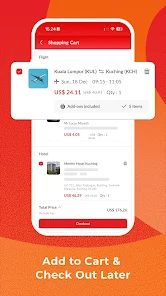
AirPaz app download — iOS, Android and what's actually inside
Where to get the real app (avoid the fake APK clones), what works better in the app than on the website, and the in-app coupons that aren't visible elsewhere.
Android: Google Play, same publisher. Free download.
Huawei AppGallery: available in some regions for HMS-only devices.
If you're in a country where Google Play is restricted (mainland China), the official AirPaz site offers a direct APK download — only trust the one linked from airpaz.com. Random "airpaz-apk-download.com" sites are not affiliated.
Is the app worth installing?
Honest answer: yes if you book at least twice a year. The website does everything the app does, but the app adds:
Biometric login (Face ID, fingerprint) — much faster than typing a password.
Push notifications for schedule changes — useful when an airline reshuffles your flight a week out.
Offline boarding pass cache — the e-ticket is viewable without data.
App-only coupons during seasonal sales — usually small (5–10%) but real.
Faster checkout with saved payment methods.
If you book once every two years, just use the website. Don't clutter your phone.
App vs website — feature parity
Feature
App
Website
Winner
Flight search
✓
✓
Equal
Multi-city search
✓
✓
Website (more flexible)
Hotel search
✓
✓
Equal
Refund request (with documents)
Limited
✓
Website
Biometric login
✓
✗
App
Offline boarding pass
✓
✗
App
Push schedule alerts
✓
Email only
App
App-only coupons
✓
✗
App
Promo banner discovery
✓
✓
Website (broader view)
System requirements
iOS: iPhone 6s or newer, iOS 13+. Roughly 80 MB.
Android: Android 7.0+, ~70 MB. ARMv7 or ARM64.
Storage in use: ~150 MB after a few months of cached boarding passes.
The app's offline boarding pass works in airplane mode. Source: airpaz.com app description.
Push notifications worth enabling
On first launch, the app asks for notification permission. Allow them. Granular controls are in Settings → Notifications:
Flight status alerts — keep on, especially for LCC bookings.
Check-in reminders — keep on (most airlines open check-in 24–48 hrs before).
Price drops on saved searches — useful for flexible travellers.
Promo banners — toggle off if you don't want marketing pings.
Biometric login setup
After first password login on the app, go to Profile → Security → Enable biometric login. iOS uses Face ID/Touch ID, Android uses fingerprint or face unlock. The biometric token is stored in the device's secure enclave, not on AirPaz servers. If you change device, you re-enable biometric on the new one.
Offline boarding pass — how to actually use it
Once you've completed online check-in via the app, the boarding pass is cached on the device. Even with airplane mode on, you can show the QR code at the gate. Caveats:
Some airports require gate-side rescans — don't rely on the cached version for security clearance.
If the airline issues a gate change or reseats, the cached pass may be stale. Check for an updated version on landing-Wi-Fi.
Screenshot the boarding pass as a backup — if the app glitches, the screenshot still scans.
App-only coupons
During 11.11, 12.12 and MATTA Fair weeks, AirPaz pushes app-exclusive codes. The savings are real (5–12% typically) but require you to complete the booking inside the app, not via the mobile web. Codes show in the "Promo" tab; tap to copy, then start a new search.
What if the app crashes?
Update to the latest version via App Store / Play Store.
Reinstall as a last resort. Your bookings live server-side — they don't get lost.
If the issue persists across reinstall, report via Profile → Support with device model and OS version.
Privacy and permissions
The app asks for:
Notifications — required for flight alerts.
Location — optional; used to default the departure airport to your current city.
Camera — optional; used for passport scanning during booking.
Calendar — optional; adds your flights to the device calendar.
You can deny everything except notifications and the app still works. Calendar access is genuinely useful — auto-added flight events with terminal info save you from typing it in.
FAQ
Is the AirPaz app safe?
Yes, when downloaded from official stores. Beware of unofficial APK mirrors that may include malware.
Can I use the app abroad?
Yes — it works wherever you have internet. Offline mode covers only saved bookings.
Does the app drain battery?
Negligibly. Background activity is minimal — flight alerts use push, not polling.
Are app prices different from website prices?
No. Same inventory and same fares. Only difference is app-exclusive coupons during specific sales.
Can I share boarding passes from the app?
Yes — tap share, send the PDF or image to your travel companion or save to wallet (iOS).
Open AirPaz, install or skip
If you book at least twice a year, install the app for biometric login and offline boarding passes.